phpYellow Pages Developer's Guide
Customize Your phpYellow Index Page
Easily change your phpYellow index page by making these changes:
Modify the header and the footer files
modify the footer.php and header.php files. You can change the top banner, navigation
and other structural or cosmetic items to suit your taste.
Make changes to util.php
util.php contains CONSTANTS used for making text labels. Things like your business name
can be changed here in one place, where it is used across the application. To modify
CONSTANTS in util.php open in a non-invasive html editor and change:
- ORGANIZATION - modify the lowercase value only
- YOURPHPYELLOWNAME - modify the lowercase value only
- SHOWAD - modify the lowercase value only
- modify other CONSTANTS as desired
- save and upload phpyellow/util.php to your server
modify or create a brand new .css file
|
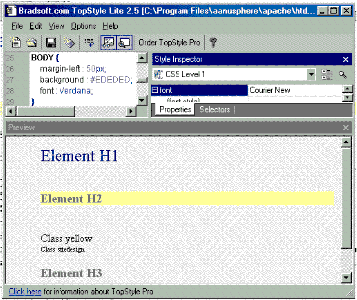
.css means cascading style sheet. The .css sheet applies formatting (such as color, size and position) to phpYellow Pages.
Save hours of work by using TopStyle from Bradsoft.com
at http://www.bradsoft.com. A free Lite edition is available too. Open /phpYellow/yellow.css
in TopStyle, modify selectors and properties, save and upload to your web server.
|
Modify premiumYourMessageHere.php
open and replace phpYellow/premiumYourMessageHere.php with YOUR message.
Change the Feature Listing
The feature listing is created by using the unique ckey field of a listing.
The script reads all of the database information for the ckey and displays it.
Here is how to change the default ckey:
- open util.php in a non invasive text or html editor
- find FEATURELISTINGNUMBER on about line 59
- enter your ckey number value like this:
define("FEATURELISTINGNUMBER", "1"); // change "1" to your ckey number
- save and upload util.php to your web server
All Pages Copyright©2000,2001,2002 Dreamriver.com. All rights reserved.